
See What Premail Has Done for You: The New Analytics Tab
· By Matt Senter
Premail has always done its work quietly. New mail arrives, rules run, the junk vanishes, the receipts get filed, the cold pitches go to quarantine. That is the entire point. You don't have to think about it.
The downside of quiet work is that it stops feeling like work at all. You forget how much triage used to live in your day, and the tool starts feeling free of charge in the wrong way: invisible, hard to justify, easy to take for granted. So we built the Analytics tab to put a real number on what Premail has been doing for you.
You can't manage what you can't see
The Activity log shows a live feed of individual messages, capped at the last 100. Useful for debugging a single classification. Useless for answering "what did Premail do for me this month?" Analytics is the other half of that picture. It keeps a persistent record of every action Premail takes, organized into a dashboard you can scope by date, by account, or by action.
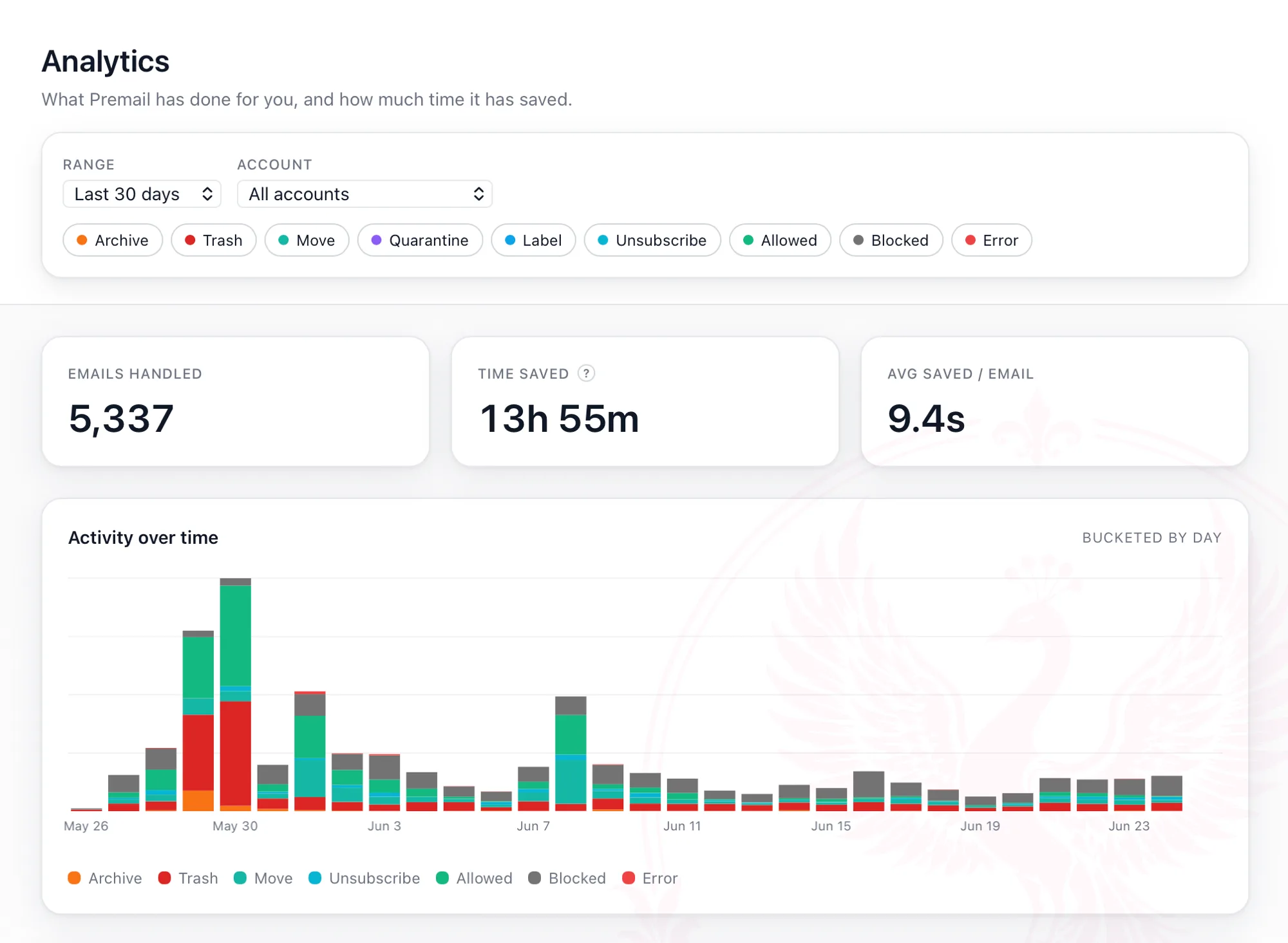
Three headline KPIs sit at the top: total emails handled, total time saved, and average time saved per email. Below that, a stacked bar chart of activity over time, colored by action type. Below that, breakdowns by action and by account so you can see which rules and which inbox did the heavy lifting. At the bottom, a lifetime card with all-time totals that the date filter never touches. It is the answer to the question your year-end self will ask: was this thing worth it?
How time saved is estimated
Time saved is the most asked-about number in the tab, so it gets its own honest explanation. Premail does not put a stopwatch on you. It uses a fixed lookup of seconds per action, based on industry averages for how long the same task takes a human. A glance-and-archive is worth a few seconds. A trash-this-junk-mail is roughly the same. Auto-unsubscribing from a mailing list, with the click-through and the confirmation page and the closed tab, is worth quite a bit more.
The total is an estimate, not an audit. It gives you an honest order of magnitude for how much manual inbox work Premail has done on your behalf, not a line-item accounting of every second. The "?" tooltip next to the Time Saved KPI says the same thing inside the app.
Date ranges and filters
A sticky filter bar at the top of the tab scopes every chart and KPI below it. Presets cover Today, Last 7 days, Last 30 days, Last 90 days, This month, and All time. Custom range covers everything in between. Account filter lets you single out one inbox or compare all of them. Action filter lets you isolate a specific outcome, like just the unsubscribes or just the cold-email quarantines, when you want to see how a particular rule has been performing.
Bucketing on the time chart is automatic. Short ranges show hourly bars, medium ranges show daily, longer windows show weekly. You don't have to think about it. The shape of the data is what you came for, and the bucket width follows the range.
Privacy posture
The analytics store is statistical only. No sender, subject, body, label name, or folder name is ever written to it. The only fields recorded per event are the action taken, the account ID (the same opaque identifier Premail uses internally, never the email address), and a timestamp. Premail has no servers processing your private data and never has, and the Analytics tab is no exception. The store lives on your computer, in your app data directory, and goes nowhere.
A Clear analytics history button at the bottom of the tab wipes the store at any time. Clearing the Activity log does not clear analytics, and clearing analytics does not clear the Activity log. They are independent stores with independent lifecycles.
A Pro feature, with a free-plan grace note
Analytics is included with Premail Pro. The free plan still records every event, though, so if you upgrade later your full history is already there waiting. Nothing to backfill, nothing lost.
Open the tab the next time you wonder whether Premail has actually been earning its keep. The numbers tend to surprise people.