Email unsubscribe apps

The best email unsubscribe apps in 2026

Six apps that unsubscribe you in bulk, compared on what they cost, where they run, and how each one makes its money. Every price and funding claim below comes from the vendor's own site, with a link so you can check it. Premail is one of the six, and we say plainly where it is the wrong choice.

The six apps, side by side

The column that usually gets left out of these lists is the last one. An unsubscribe app needs standing access to your mailbox to do its job, so how it pays for itself is not a footnote, it is a feature of the product. Prices were read from each vendor's own pricing page in September 2026.

AppPriceRuns onHow it makes money
PremailFree for 2 personal inboxes, then $9/mo, $79/yr, or $99 onceYour own computerPaid licences
Clean Email$9.99/mo, or $29.99/yrCloudSubscriptions
Unroll.MeFreeCloudFree, no paid tier advertised
CleanfoxFreeCloudSells data for statistical purposes, by its own description
Mailstrom$9/mo, or $59.95/yrCloudSubscriptions
Gmail's built-in unsubscribeFreeGmailPart of Gmail

1. Premail

Free for 2 personal inboxes, then $9/mo, $79/yr, or $99 once

Best for: People who do not want a third party holding standing access to their mailbox

Premail is a desktop app rather than a web service, so unsubscribing happens on your own machine and there is no Premail server holding a token to your inbox. It finds your subscriptions, unsubscribes in bulk, and then keeps working on whatever still arrives, sorting it with rules you write in plain English. The trade-off is real and worth naming: filtering only runs while your computer is on, so if you need mail triaged overnight on your phone, a cloud service will suit you better.

SourcePremail pricing

2. Clean Email

$9.99/mo, or $29.99/yr

Best for: Bulk cleanup across several mailboxes at once

Clean Email is the most fully featured of the cloud cleaners: bulk unsubscribe, rules, smart views, and a screener, with every feature available on every tier. It prices purely on how many mailboxes you connect, so one inbox is inexpensive and a household of five is not much worse. It states that its income comes from subscription fees rather than from selling data, which puts it in a different category from the free tools below.

SourcePremail vs Clean Email

3. Unroll.Me

Free

Best for: Rolling many newsletters into one daily digest

Unroll.Me is the best known name here and the easiest to start with: connect a mailbox, pick what to keep, and roll the rest into a single digest. There is no paid tier on offer, which is the part worth thinking about rather than skipping, because a free service that needs permanent access to your mailbox is funded somehow. If the digest format is what you actually want, nothing else does it as smoothly.

SourcePremail vs Unroll.Me

4. Cleanfox

Free

Best for: A fast free cleanup when the funding model is acceptable to you

Cleanfox does one-click unsubscribe and bulk deletion, and it is free. It is also unusually direct about why. Its own homepage says, in its words: "To keep Cleanfox free, we sell data for statistical purposes." That is their statement, not an accusation, and it is more transparency than most free tools offer. Whether that is an acceptable price is a judgement only you can make, but you should make it knowingly.

Source

5. Mailstrom

$9/mo, or $59.95/yr

Best for: Very large backlogs, sorted into bundles

Mailstrom is built around grouping a huge inbox into bundles by sender, subject, or size so you can act on thousands of messages at once, with unsubscribe alongside it. Its tiers move on three axes at the same time: how many accounts, how large a mailbox it will process, and how many smart filters you get. If your problem is a quarter of a million messages rather than a dozen newsletters, that shape makes sense.

SourcePremail vs Mailstrom

6. Gmail's built-in unsubscribe

Free

Best for: Anyone who only needs to stop a handful of senders

It deserves saying plainly: if you only need to drop a few newsletters, Gmail already shows an unsubscribe link beside the sender on marketing mail, and it costs nothing and grants nobody new access to anything. What it will not do is show you every subscription you have accumulated in one list, act on them in bulk, or do anything about the mail that keeps arriving afterwards. Start here before installing anything, and move on only when the one-at-a-time pace stops being tolerable.

Source

Two names you might expect are missing. Leave Me Alone is absent because its site would not load on any attempt while this was written, and quoting a price we could not read would be worse than leaving it out. SaneBox is a triage service rather than an unsubscribe tool, so it is covered in the SaneBox comparison instead.

The catch with "free" unsubscribe tools

If you are not paying, your inbox might be the product

To unsubscribe for you, a cloud app needs ongoing access to your entire mailbox, and that access is worth money. This is not speculation and it is not a smear: Cleanfox says on its own homepage that it sells data for statistical purposes in order to stay free. Being told plainly is better than not being told, and some people will read that and decide it is a fair trade. The point is that it is a trade, and a free tool that never mentions how it is funded has not spared you the decision, only the information. A local app removes the question: there is no server to send your mail to.

Unsubscribe, then stay unsubscribed

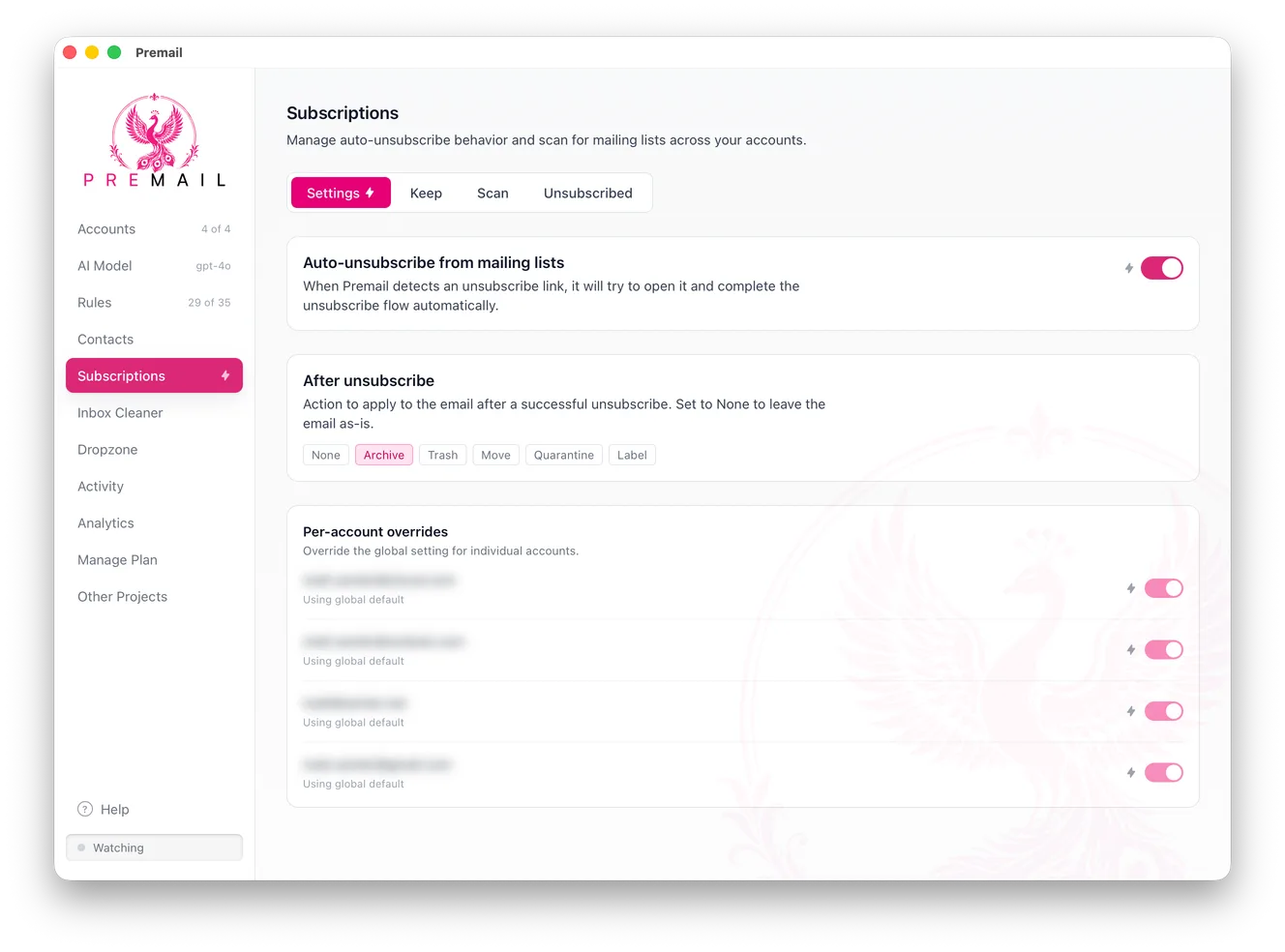
The Premail Subscriptions screen showing an auto-unsubscribe toggle, an after-unsubscribe action set to Archive, and per-account overrides for each connected inbox.
Turn on auto-unsubscribe, choose what happens to the message afterwards, and override the setting per account.

Bulk unsubscribe

Surface your subscriptions and opt out of the ones you no longer want, many at a time, instead of hunting for tiny unsubscribe links one by one.

On your machine

Everything runs locally. With a local AI model your mail never leaves your computer, and no third party gets standing access to your mailbox.

Keep it clean

Whatever still arrives gets sorted by plain-English AI rules: receipts archived, cold pitches quarantined, notifications filed, automatically.

Unsubscribing is only half the problem

Newsletters are easy to opt out of. The harder noise, cold sales outreach, recruiter spam, automated notifications, and routine acknowledgements, has no unsubscribe link. That mail keeps coming no matter how much you unsubscribe. Premail handles it by reading each message and filing it before you see it, which is why it keeps your inbox clean in a way a pure unsubscribe tool cannot.

Frequently asked questions

What is the best email unsubscribe app?

It depends on what you are solving. For a handful of senders, Gmail’s built-in unsubscribe link is free and enough. For a very large backlog, Mailstrom is built around bundling tens of thousands of messages. For several mailboxes at once, Clean Email covers them on one subscription. Premail is the pick if you would rather no third party held standing access to your mailbox at all, because it runs on your own computer.

Are free unsubscribe apps safe?

Some are, but read how they are funded before connecting a mailbox. Cleanfox states on its own site that it sells data for statistical purposes to stay free, which is more transparency than most free tools offer, and some people will read that and decide it is a fair trade. The thing to avoid is a free tool that needs permanent mailbox access and never says how it pays for itself. Premail is local, so the question does not arise: there is no server to send your mail to.

Does it just unsubscribe, or also keep my inbox clean?

Both. Bulk unsubscribe stops the mail you no longer want at the source. Premail also applies plain-English AI rules to whatever still arrives, archiving receipts, quarantining cold pitches, and filing notifications, so your inbox stays clean going forward, not just today.

Which email providers does it work with?

Gmail, Outlook, and iCloud. Premail acts on your real inbox alongside whatever email client you already use on Mac, Windows, and Linux.

How much does it cost?

Premail is free for up to two personal inboxes, then $9/mo, $79/yr, or $99 once for professional inboxes, with no per-inbox pricing. For what the alternatives cost, see the table above: every figure there was read from the vendor’s own pricing page.

Clean out the noise for good

Free for personal inboxes. No account, no servers touching your email. Works alongside the email client you already use on Mac, Windows, and Linux.

DownloadSee pricing