
Blocked Senders
Last updated
Blocked senders are the opposite of the allowlist. Any email from a blocked domain or address goes straight to trash, without AI classification, without hesitation. You've decided you're done with these senders.
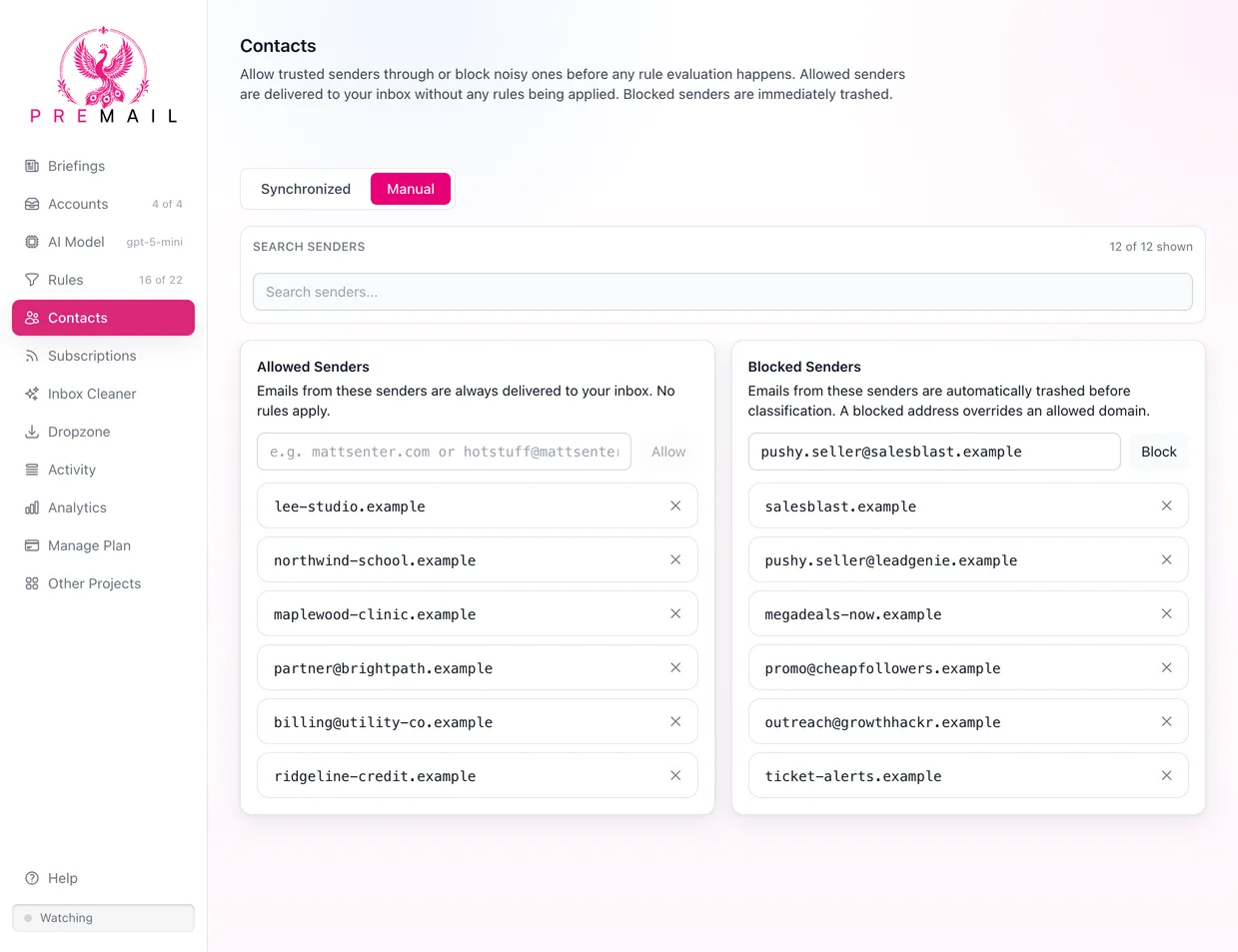
You can block by domain (e.g. dominos.com) to catch every sender on that domain, or by specific address (e.g. noreply@dominos.com) to target a single sender. Both are managed from Contacts › Manual.
This is useful for persistent senders that don't honor unsubscribe requests, or that keep reappearing from slightly different addresses within the same domain. Block the domain once and that's the end of it, as far as your inbox is concerned.
How do you block a sender?
- 1Open Contacts and choose the Manual tab.
- 2Under Blocked Senders, type a domain such as
spam.comor an address such asnoreply@spam.com. - 3Click Block. The entry applies to the next message from that sender.
You can also block from a message you are looking at: open its entry in the Activity tab and choose to add the sender's address or domain to your block list.
What happens to a blocked message?
Premail moves it to your Trash and marks it as read. It is never sent to the AI, so a blocked sender costs nothing in AI usage, and no rule, unsubscribe attempt, or automatic reply runs. The sender is not told. The message shows up in the activity log as trashed, so you can always see what was caught.
Blocking only affects new mail. Messages that arrived before you added the entry stay where they are. Trashed mail is kept for as long as your email provider keeps Trash, so a mistake can be undone: remove the entry, then move the message back from Trash.
Should I block or unsubscribe?
For a legitimate company that sends you a mailing list, unsubscribing is usually the better first step, because the mail stops at the source. See Manage Email Subscriptions. Blocking is the backstop for senders that ignore unsubscribe requests or never offered one.
Avoid blocking a shared provider domain such as gmail.com. That would trash mail from everyone on that provider, including people you know. Block the exact address instead.
How are allowlist and blocklist conflicts resolved?
You can block by domain or by specific address. A domain entry catches every sender from that domain, including subdomains. An address entry catches only that exact address.
Priority order when entries conflict:
- Blocked address wins over everything, including an allowlisted domain. If
mattsenter.comis on your allowlist butnewsletter@mattsenter.comis blocked by address, that address gets trashed regardless. - An allowed address beats a blocked domain. If
spam.comis blocked butbilling@spam.comis allowed, mail from that one address still reaches your inbox. - Allowlisted domain beats a blocked domain. The allowlist is checked before domain-level blocks. If a domain appears on both lists, the allowlist wins.
- Domain blocks apply last. If a sender isn't explicitly allowed and isn't address-blocked, a matching domain block trashes the message.
Both Manual lists are checked before your synchronized contacts, so a Manual entry wins over a contact's Allowed or Blocked state. See Contacts and Address Book.
Like the allowlist, blocking runs before AI classification. Blocked messages are trashed immediately. To catch spam domains you have never seen before, Pro users can also turn on Reputation Shield, which trashes mail from domains on the Spamhaus Domain Block List.
Still have questions?
Contact Support (for Pro members)