

Premail v1.5.0: Bring Any Email Account
· Written by Matt Senter, creator of Premail
Until now, Premail worked with Gmail, iCloud Mail, and Outlook. That covers a lot of inboxes, but not the Yahoo address you have had since 2004, the Fastmail account you pay for because you want your email kept private, or the mailbox your internet provider gave you. Premail v1.5.0 connects almost all of them.
One more option: Other email provider
The add-account row now ends with Other email provider. It connects any mailbox that offers IMAP, the standard way mail apps read email: Yahoo Mail, AOL Mail, Zoho Mail, GMX, mail.com, WEB.DE, Yandex Mail, your internet provider’s email, or a server you run yourself. Once it is connected, the account works like every other one in Premail. It has the same rules, the same AI model, Learning mode first, and its own place in Activity, Subscriptions, Inbox Cleaner, and Briefings.
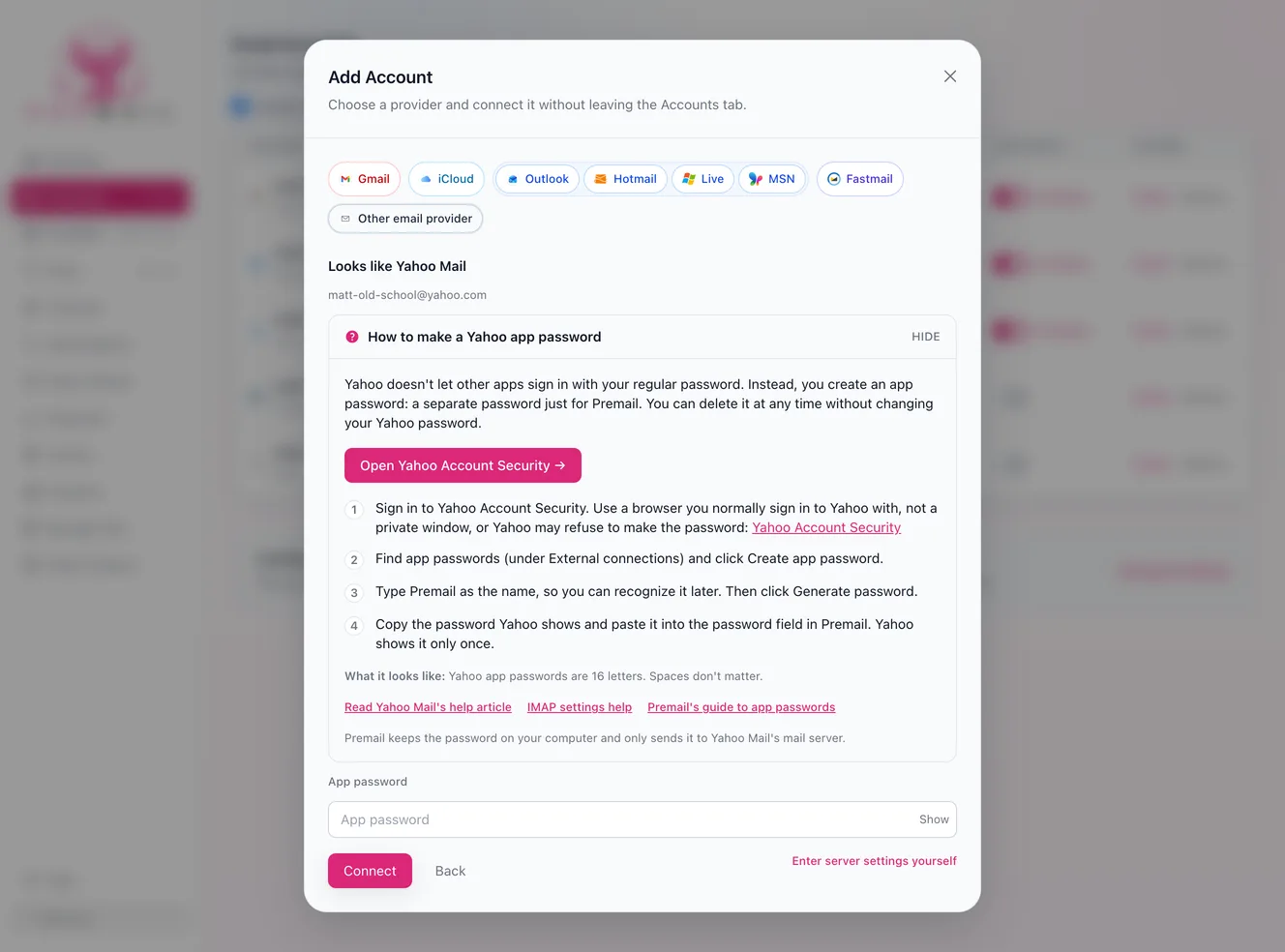
You type your address, Premail finds the servers
Mail apps have always asked for server names, port numbers, and security settings, and most people have never had a reason to know them. Premail looks them up instead. It checks its own list of well-known providers first, then your domain’s mail records, the settings file many providers publish, Mozilla’s public database of mail servers, and finally the common server names. It doesn’t ask for a password while it looks.
Most big providers no longer accept your regular password from other apps, so you make an app password: a separate password just for Premail that you can revoke at any time. When Premail recognizes the provider, it shows that provider’s steps right beside the password field, with a button that opens the right settings page. Before anything is sent, a confirm screen shows the exact server your password will go to, so you can make sure it belongs to your provider. Premail only connects over encrypted connections and refuses a server whose certificate it can’t verify.
If Premail can’t find the settings, or you would rather type them yourself, the manual form takes the incoming and outgoing servers directly. The Other email providers guide walks through every step and every error message.
Fastmail gets its own button
Fastmail sits in the row next to Gmail, iCloud, and Outlook. Make one app password in Fastmail’s settings with Mail, Contacts & Calendars access, paste it in, and Premail watches your mail and syncs your Fastmail address book with the same password. Synced contacts are how Premail tells the people you know apart from strangers, so a friend’s first email in a year is never filed away as a cold pitch. The Fastmail guide has the details.
Contacts from Zoho, GMX, and WEB.DE
The same contacts sync works for Zoho Mail, GMX (gmx.net and gmx.de), and WEB.DE when their app password is allowed to read contacts. Yahoo, AOL, mail.com, and accounts without built-in settings are mail only for now. Your allow and block lists still cover them, and the account summary says plainly which features each account has.
Folders and sending, your way
Every IMAP server names its folders a little differently. Premail reads the folder roles your server advertises, falls back to familiar names like Archive, Deleted Items, and Bulk, and shows you what it picked for Archive, Trash, and Junk, with a Change button beside each one.
Sending settings are optional. Premail only sends mail for one thing, an automatic reply to cold outreach, so you can skip the outgoing server entirely and everything else still works. Add it later from the account’s settings if you want auto-replies from that address.
Mark junk mail as read
Your provider files a lot of mail in Junk before Premail ever sees it, so no rule gets the chance to mark it read and the folder keeps a growing unread count. Turn on Mark junk mail as read in the Rules tab and Premail marks everything in your Junk or Spam folder as read, about once a minute. Your inbox and Trash are left alone. The Built-in Email Rules guide lists every Mark as Read switch.
What it costs
Nothing extra. A Yahoo, AOL, GMX, or fastmail.com address is a personal inbox and counts toward the free plan’s two personal inboxes, just like a Gmail or iCloud address. An address on your own domain is a professional inbox and needs Premail Pro, whichever provider hosts it.
Fixes and polish
A team-chat or workspace invite sent on behalf of a stranger, the kind that uses a real collaboration app to carry spam past filters, is now treated as likely spam instead of a developer notification. Security Quick Access finds codes after sentences like “enter the access code below” and “enter the following code for verification”. And Premail remembers its window size every time it opens, not just every other time.
Read the v1.5.0 release notes for the full list, or download Premail for Mac, Windows, and Linux.