
Briefings: A Digest, Not a Notification
· Written by Matt Senter, creator of Premail
Premail's whole premise is that most of your inbox does not deserve your attention, so it quietly archives, trashes, or files it before you ever see it. That works, but it leaves an honest question unanswered: if the inbox stays quiet, how do you know anything actually needs you? Checking "just in case" defeats the point. Briefings is our answer: a short, scheduled memo that tells you exactly that, and nothing else.
A memo, on your schedule
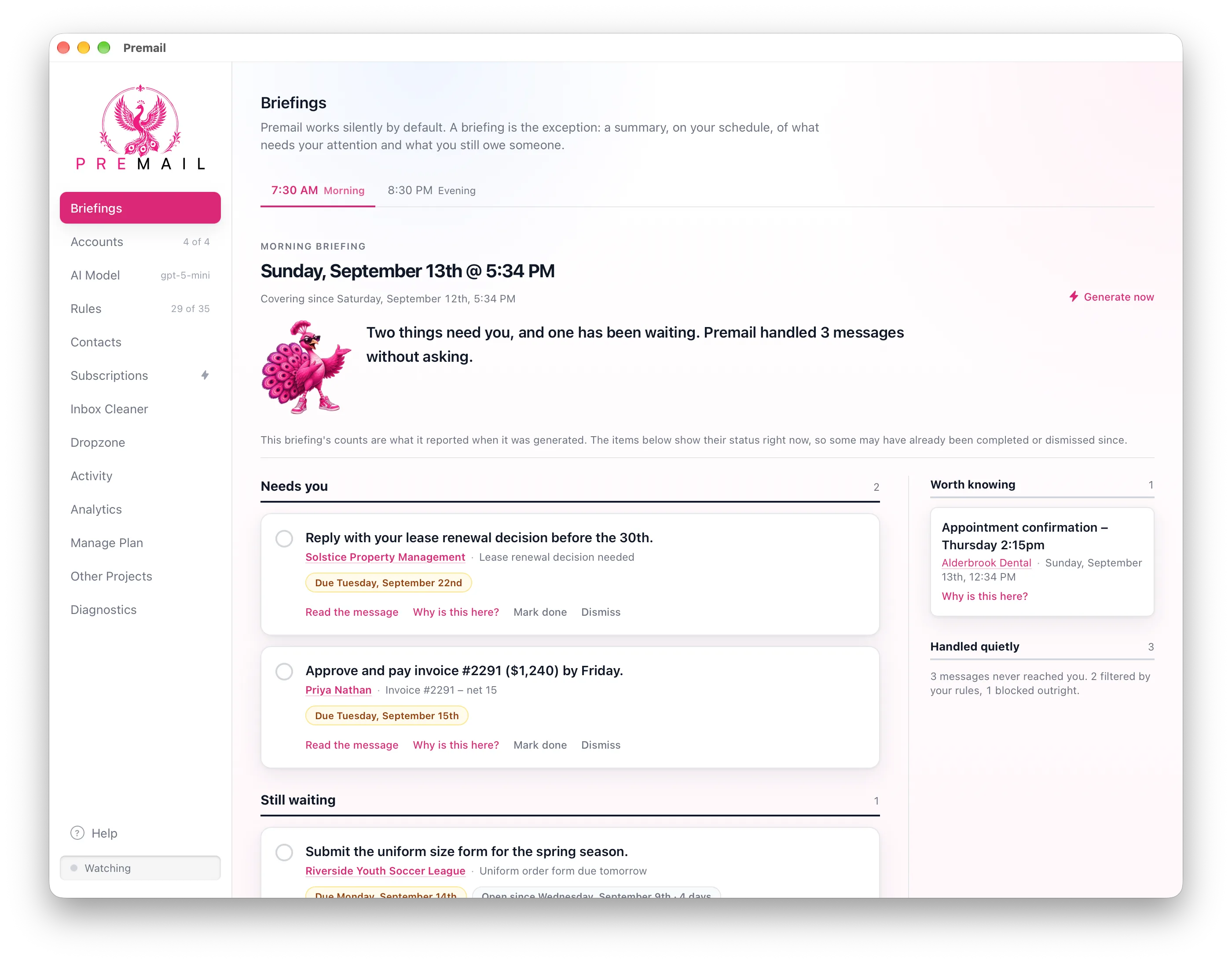
Set up a briefing for the times that fit how you actually work: a Morning briefing at 7:30am, an Evening one at 8:30pm, a Midday check-in, or a custom name and time of your own. Add as many as you want, rename or reschedule any of them, and pause or delete one without losing the others. Premail generates each briefing on its own at the scheduled time, whether or not the app is even open in front of you, and covers everything since the last one ran.
Prefer to check on your own timing instead of waiting? Every briefing schedule has a Generate now option, and a calendar lets you flip back through past briefings whenever you want the history.
Four sections, not a wall of email
A briefing is not a re-listing of your inbox. It reads what changed and sorts it into four short sections:
- Needs you: a reply you owe, an invoice due, a decision with a real deadline.
- Still waiting: something you already started that has gone quiet longer than it should have.
- Worth knowing: useful context, like an appointment confirmation, that does not need you to do anything.
- Handled quietly: a count of what your rules already took care of, so the silence in your inbox is accounted for instead of just assumed.
Each item under "Needs you" and "Still waiting" links straight back to the original message, and an explanation shows why Premail flagged it, so a briefing never asks you to trust it blindly.
Surfaced, not shouted
Briefings deliberately do not use a desktop notification. A pop-up that steals focus the moment a schedule fires is the exact interruption Premail exists to remove. Instead, an optional tray icon badge lets you know a scheduled briefing is ready whenever you next glance at your menu bar, on your terms, not the app's.
Why this belongs in Premail
Every other Premail feature works by acting on mail so you do not have to think about it. Briefings is the piece that reports back on all of that action, in one place, in plain language, on a schedule you set. It runs entirely on your machine like the rest of Premail: no account, no server reading your inbox to write your summary for you.
If you already use Premail, open the Briefings tab and set up your first schedule. If you have not tried Premail yet, this is one more reason your inbox does not need to be something you check. Download Premail and give it a try.