
Reputation Shield
Last updated
Reputation Shield checks the sender's domain against community-maintained threat feeds before any AI classification or rule evaluation happens. If a domain is listed, the message is trashed immediately. No AI credit is consumed, and no rule needs to match.
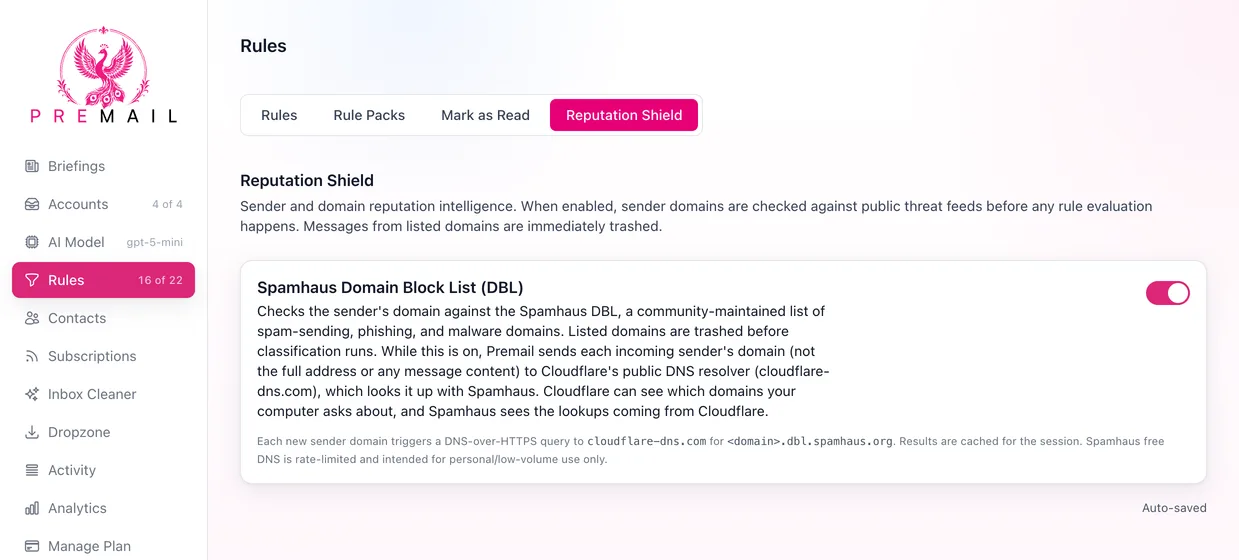
What is the Spamhaus Domain Block List?
The Spamhaus DBL is a community-maintained list of domains associated with spam, phishing, and malware campaigns. Premail queries it using Cloudflare DNS-over-HTTPS, so Spamhaus sees each lookup as coming from Cloudflare rather than from your computer. Results are cached for the session so each domain is only looked up once per run.
What leaves your computer when Reputation Shield is on?
Reputation Shield is on by default for Pro plans. While it is on, Premail sends the domain part of each new sender's address (for example, example.com) to Cloudflare's public DNS resolver at cloudflare-dns.com, which looks it up with Spamhaus. The full sender address, the subject, and the message content are never sent. Over time, Cloudflare can see which domains your computer asks about, and so which domains send you mail. Cloudflare's own privacy policy applies to those lookups. Turn Reputation Shield off to stop them.
When does Reputation Shield run?
Reputation Shield fires at the very start of the processing pipeline, before custom rules, built-in rules, and AI classification. If a domain matches, the pipeline stops there. The message never reaches the AI.
- Fires before all rules and AI classification
- Matching messages are trashed immediately
- DNS results are cached per session to reduce lookups
Still have questions?
Contact Support (for Pro members)