
How to Stop Political Emails Before the Midterms
· Written by Matt Senter, creator of Premail
Every election season follows the same pattern. You chip in once, sign one petition, or give your address to one campaign, and within a month you are hearing from dozens of candidates, committees, and PACs you have never heard of. The subject lines escalate as November gets closer: "FINAL NOTICE", "500% MATCH EXPIRING", "Your official member survey is overdue", "Can we count on your vote?"
With the 2026 midterms on November 3, the volume is only going up from here. This guide covers why the usual fixes fail on political mail, what you can do with the tools you already have, and how Premail's new Political Pack handles the rest. None of it cares which party or cause is emailing you. It treats all of them the same.
Why unsubscribing barely dents it
Unsubscribing is still worth doing for a list you actually signed up for, but political email is built in a way that makes it a losing game on its own:
- Every committee is its own list. A candidate, their leadership PAC, the party's House or Senate committee, and a joint fundraising committee can all email you separately. Unsubscribing from one leaves the others running.
- Lists are shared and rented. Campaigns routinely rent and swap donor lists with allied groups, so your address keeps landing on lists you never joined.
- The usual commercial rules mostly do not apply. The CAN-SPAM Act's opt-out requirements cover commercial email, and political solicitations generally fall outside them. Many campaigns honor unsubscribes anyway, but not all of them do it quickly, and a new committee is not bound by what you told an old one.
- Much of it is not spam. It comes from real, authenticated senders, so your provider's spam filter often lets it through, especially if you ever opened or replied to one.
What you can do with the tools you already have
Before reaching for anything new, these steps take a few minutes and help noticeably:
- Filter on the disclaimer. Email from a political committee sent to more than 500 people generally has to carry a "Paid for by" notice. In Gmail, search for
"paid for by", then choose Create filter from the search options and have matches skip the inbox or apply a label. In Outlook, a rule on messages whose body contains "Paid for by" does the same job. - Use a separate address for donations and petitions. A plus address (
you+campaigns@gmail.com) or a dedicated account keeps future list sharing away from your main inbox, and makes the first filter trivial. - Unsubscribe from the lists you chose, and mark the rest as spam. That combination at least stops the senders you can identify.
The weakness is the same one that makes keyword rules miss spam. Not every message carries the disclaimer in a form a filter can match, surveys and "polls" are written to look like something else, and a rule strict enough to catch everything will also catch your county's ballot notice.
How Premail's Political Pack handles it
Premail classifies each new message by what it actually is, not by which words appear in it. The Political Pack turns on a built-in Political category that recognizes mail from candidates, campaigns, party committees, PACs and super PACs, and donation platforms such as ActBlue and WinRed, across all the shapes it takes:
- Fundraising asks, match deadlines, and end-of-quarter countdowns
- Polls, "official member surveys", and straw votes
- Petitions and pledge drives
- Get-out-the-vote reminders, early-voting nudges, and "make your plan" emails
- Volunteer, phone-bank, and grassroots organizing requests
- Campaign newsletters and trail updates
By default the pack moves all of it into a Political folder, out of your inbox but never deleted, so you can still read it on your own time or check what a candidate is saying. You can switch the action to archive or trash, or tune how aggressive the filter is, from the Rules tab.
Political is also one of the categories Premail's auto-unsubscribe can act on. Turn it on for an account and Premail follows the unsubscribe link on each campaign list as it arrives, so the pile shrinks over time instead of just being hidden.
What it deliberately leaves alone
Filtering political mail should not mean missing the civic mail you need. A few things are kept out of the Political category on purpose:
- Official election mail. Voter registration confirmations, sample ballots, and mail-ballot tracking from your election office are classified as Legal, not Political, so they stay findable.
- News about politics. A newsletter you subscribe to from a news outlet is a newsletter, not campaign mail.
- Charities. Nonprofit donation appeals stay in the separate Fundraising category, so you can treat them differently.
- People you know. If you sync your contacts, a friend forwarding a campaign email is treated as a person writing to you, not a campaign.
Setting it up
The Political Pack is part of Premail Pro. Once you are on Pro:
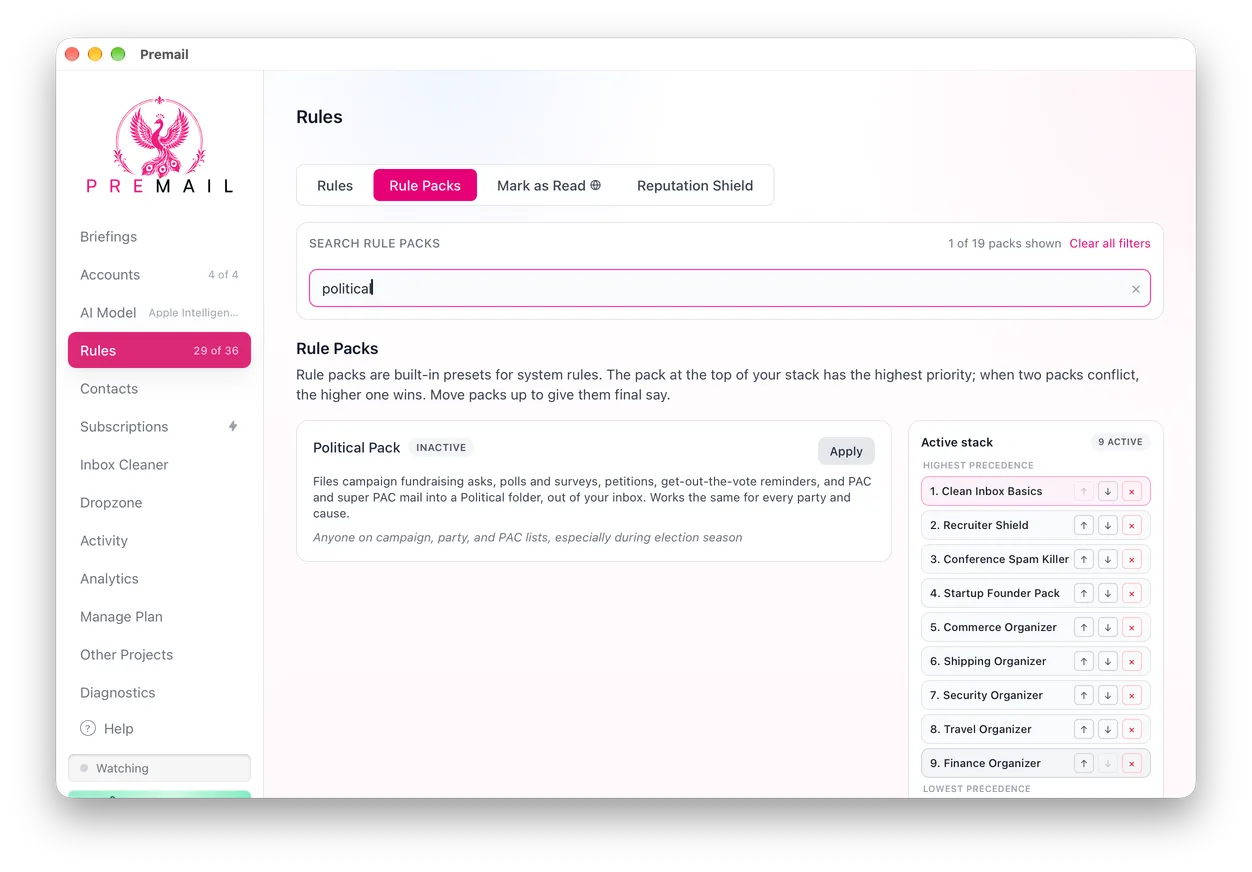
- Open Premail and go to Rules › Rule Packs.
- Find Political Pack and choose Apply.
- Leave the account in Learning mode for a day to see what would be filed, then switch it to Live.
Premail runs on Mac, Windows, and Linux, works with Gmail, Outlook, iCloud, and other IMAP inboxes, and classifies mail with the AI model you choose, including a local one, so no Premail server ever reads your email. You keep your email app. The campaigns just stop shouting at you from the top of the inbox.