
Classify Your Email With Apple Intelligence, No API Key
· Written by Matt Senter, creator of Premail
Updated
Premail has always needed a model. Until now that meant one of two things: paste in an Anthropic or OpenAI key and pay a fraction of a cent per message, or install Ollama, pull a model, and run it yourself. The first is easy but sends your mail to a company. The second sends your mail nowhere but asks you to become, briefly, a person who manages model downloads.
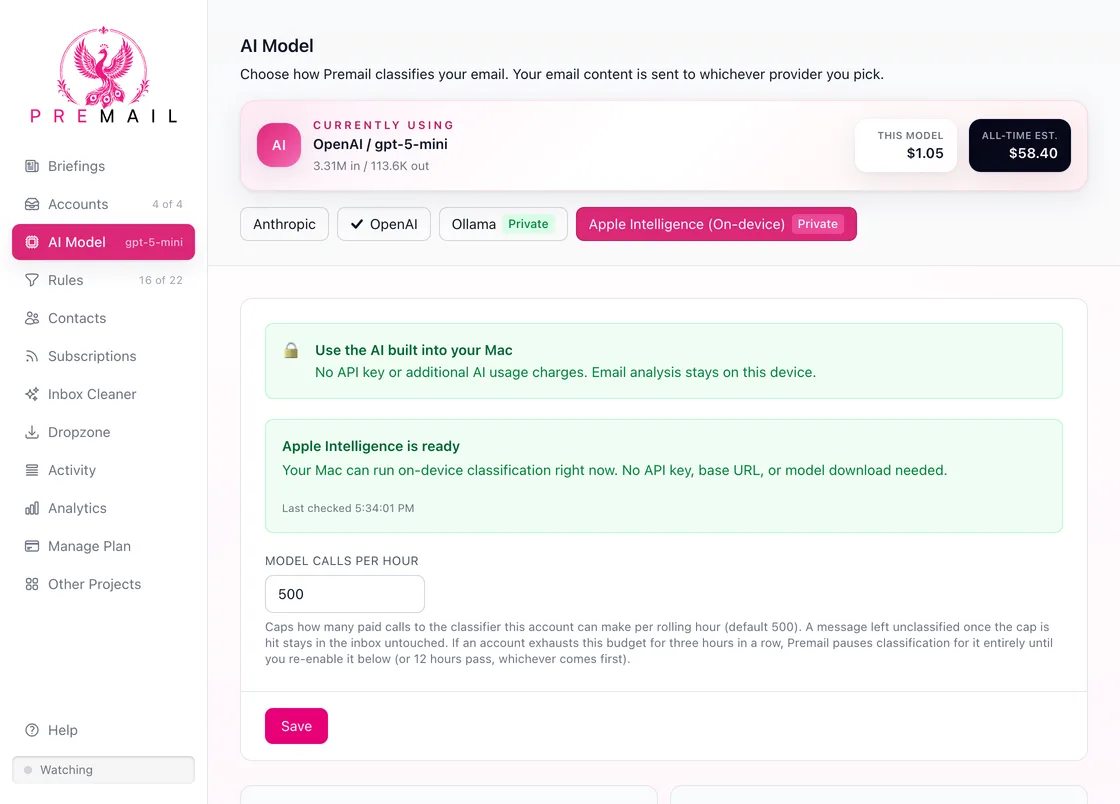
On a Mac that supports Apple Intelligence, there is now a third option with neither cost: select Apple Intelligence in the AI Model tab. There is no key to paste, no account to create, no model to download, and nothing to install. Apple already shipped the model with macOS. Premail just asks it questions.
What "on-device" actually means here
It means the specific thing, not the marketing thing. When Apple Intelligence is your provider, the sender, subject, and body of each message go to a model running on your own Mac. They do not go to Premail, because Premail has no servers. They do not go to Anthropic or OpenAI. They do not go to Apple's Private Cloud Compute either, which is a real distinction worth making: Apple offers both an on-device model and a server-side one, and Premail uses only the on-device one.
There is also no quiet fallback. If the on-device model is unavailable, or declines a particular message, Premail does not reroute that message to a cloud provider to get an answer. It leaves the message unclassified and untouched in your inbox, and tells you why. A message Premail could not classify is never treated as a message Premail is confident about.
The honest trade-off
A model that fits on a laptop and runs for free is not the same model as one running in a data center, and we are not going to pretend otherwise. Apple's on-device model works with a much smaller context window than the cloud models Premail supports, which means Premail has to say more with fewer words when it describes your categories to it. On our own labeled test mail, classification accuracy with Apple Intelligence currently trails Anthropic and OpenAI by a wide margin, and we are still working on closing that gap rather than claiming it is closed.
So pick it for what it actually is. If your priority is that nothing leaves your Mac and nothing costs anything, Apple Intelligence gives you that with no setup at all. If your priority is the most accurate filing, a cloud key is still the better tool today, and switching providers in Premail takes one click and keeps your existing keys and settings intact.
Whether your Mac can do it
Apple decides this, not Premail. It needs a Mac that supports Apple Intelligence, running macOS 26 or later, with Apple Intelligence turned on and macOS finished downloading the model assets. Language and region settings matter too.
Rather than guess, Premail asks macOS directly and shows you the answer: ready, turned off, still downloading, or not supported on this Mac. Each state comes with what to do about it, including a button that opens the right System Settings pane. That pane moved between releases, incidentally. On macOS 26 it is Apple Intelligence & Siri. On macOS 27 it is just Siri, with no separate Apple Intelligence switch at all, because Apple Intelligence is on whenever Siri is. Premail's help covers both, and its button goes to the right place on either.
If you turn it on while Premail is open, you do not need to restart anything. Premail rechecks when the window regains focus, so coming back from System Settings is enough.
Nothing changes if you don't want it to
Existing setups are untouched. Premail does not switch your provider for you, does not make Apple Intelligence the default, and does not remove or overwrite the keys you already have. If you restore a settings backup that selected Apple Intelligence onto a Windows or Linux machine, Premail explains that the provider is unavailable there rather than silently swapping in something else.
Premail's own pricing does not change either. "No AI usage charges" describes this provider, not the app.
The setup guide has the full walkthrough, every availability state, and what to do when something is not working.